
Inspire
Link 1
Link 2
At home
Choose your home Internet
Home FibreMulti-room WiFiPortable Home WiFiCheck coverageFind the right planFibre set up and supportA roaming pass for Umrah pilgrims — reliable, seamless, and ready when you land in Saudi Arabia

Share updates, prayers and meaningful moments easily, allowing family at home to follow your Umrah journey and feel close to you

From Mecca to Madinah, enjoy reliable coverage across all major Saudi networks (Mobily, STC and Zain KSA) throughout your pilgrimage

Extend your travels across the region. Your pass keeps you connected in Saudi Arabia, Turkey, Egypt, UAE, Qatar, Jordan, and more.

The only roaming pass with the widest coverage across Saudi Arabia’s major networks (Mobily, STC and Zain KSA)
Albania · Argentina · Armenia · Australia · Austria · Azerbaijan · Bahrain · Bangladesh · Belarus · Belgium · Bosnia and Herzegovina · Brazil · Brunei Darussalam · Bulgaria · Cambodia · Canada · Chile · China · Congo DRC · Croatia · Cyprus · Czech Republic · Denmark · Egypt · El Salvador · Estonia · Finland · France · Georgia · Germany · Ghana · Greece · Guatemala · Guernsey · Hong Kong · Hungary · Iceland · India · Indonesia · Iraq · Ireland · Isle of Man · Italy · Japan · Jersey · Jordan · Kazakhstan · Korea · Kuwait · Kyrgyzstan · Laos · Latvia · Liechtenstein · Lithuania · Luxembourg · Macau · Malta · Mexico · Mozambique · Nepal · Netherlands · New Zealand · Norway · Oman · Pakistan · Peru · Philippines · Poland · Portugal · Puerto Rico · Qatar · Romania · Russia · Saudi Arabia · Serbia · Singapore · Slovakia · Slovenia · South Africa · Spain · Sri Lanka · Sweden · Switzerland · Taiwan · Tanzania · Thailand · Timor-Leste · Turkey · UAE · UK · Ukraine · Uruguay · USA · Uzbekistan · Vietnam


Albania · Argentina · Armenia · Australia · Austria · Azerbaijan · Bahrain · Bangladesh · Belarus · Belgium · Bosnia and Herzegovina · Brazil · Brunei Darussalam · Bulgaria · Cambodia · Canada · Chile · China · Congo DRC · Croatia · Cyprus · Czech Republic · Denmark · Egypt · El Salvador · Estonia · Finland · France · Georgia · Germany · Ghana · Greece · Guatemala · Guernsey · Hong Kong · Hungary · Iceland · India · Indonesia · Iraq · Ireland · Isle of Man · Italy · Japan · Jersey · Jordan · Kazakhstan · Korea · Kuwait · Kyrgyzstan · Laos · Latvia · Liechtenstein · Lithuania · Luxembourg · Macau · Malta · Mexico · Mozambique · Nepal · Netherlands · New Zealand · Norway · Oman · Pakistan · Peru · Philippines · Poland · Portugal · Puerto Rico · Qatar · Romania · Russia · Saudi Arabia · Serbia · Singapore · Slovakia · Slovenia · South Africa · Spain · Sri Lanka · Sweden · Switzerland · Taiwan · Tanzania · Thailand · Timor-Leste · Turkey · UAE · UK · Ukraine · Uruguay · USA · Uzbekistan · Vietnam

Purchase and schedule your Saudi Arabia roaming pass easily before you travel
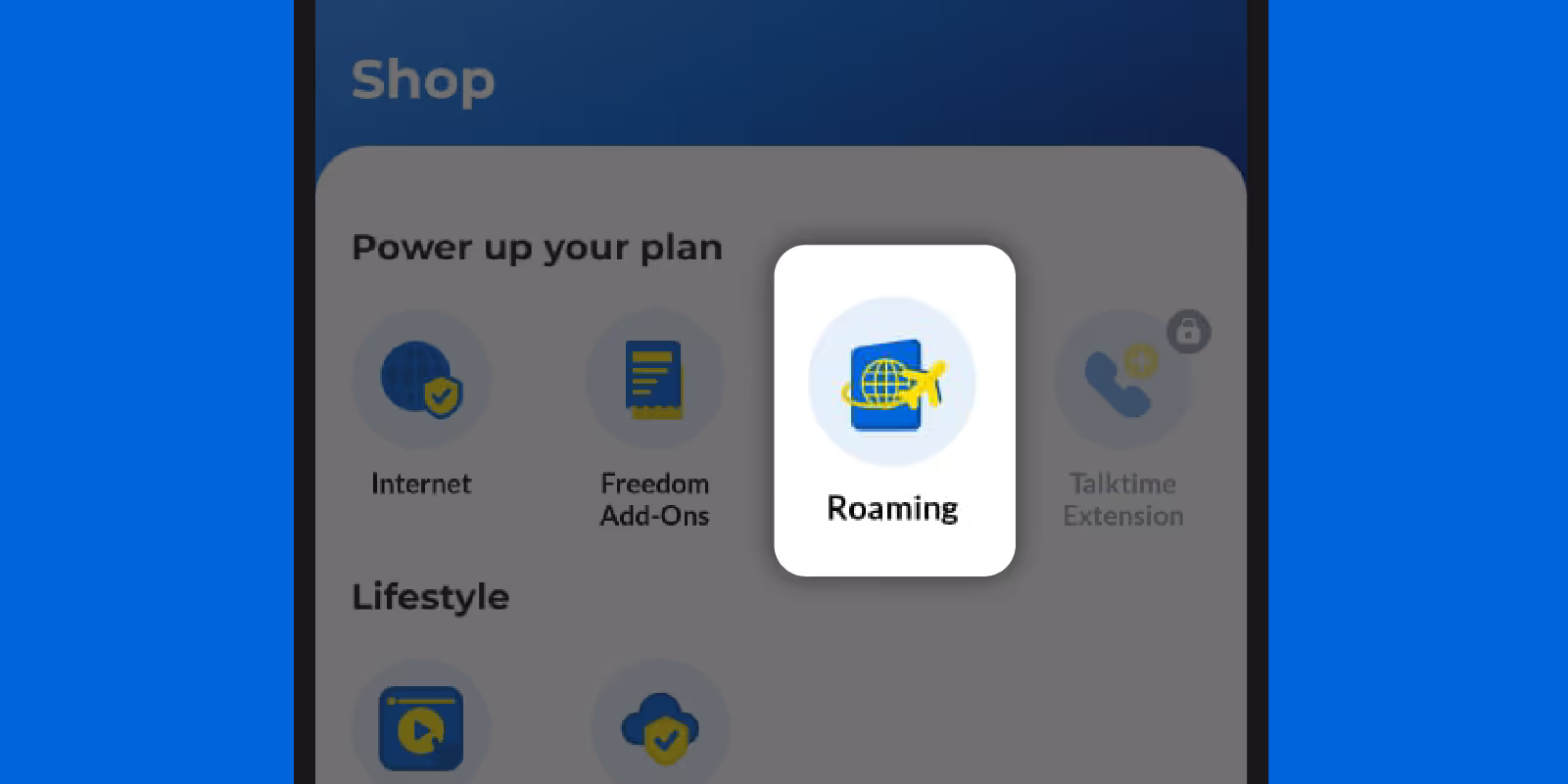
On your CelcomDigi app's home screen, tap ‘Roaming’
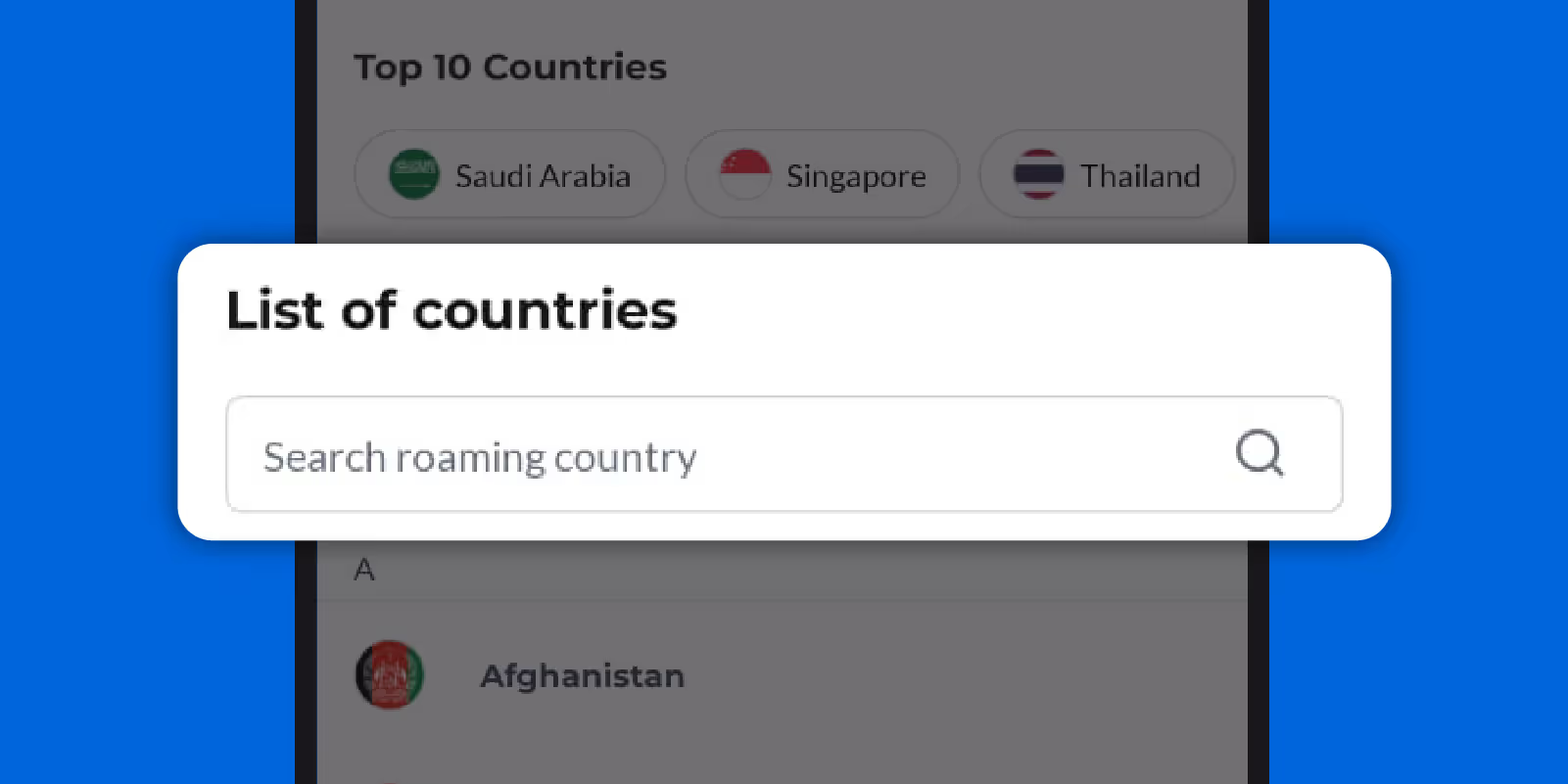
Select Saudi Arabia
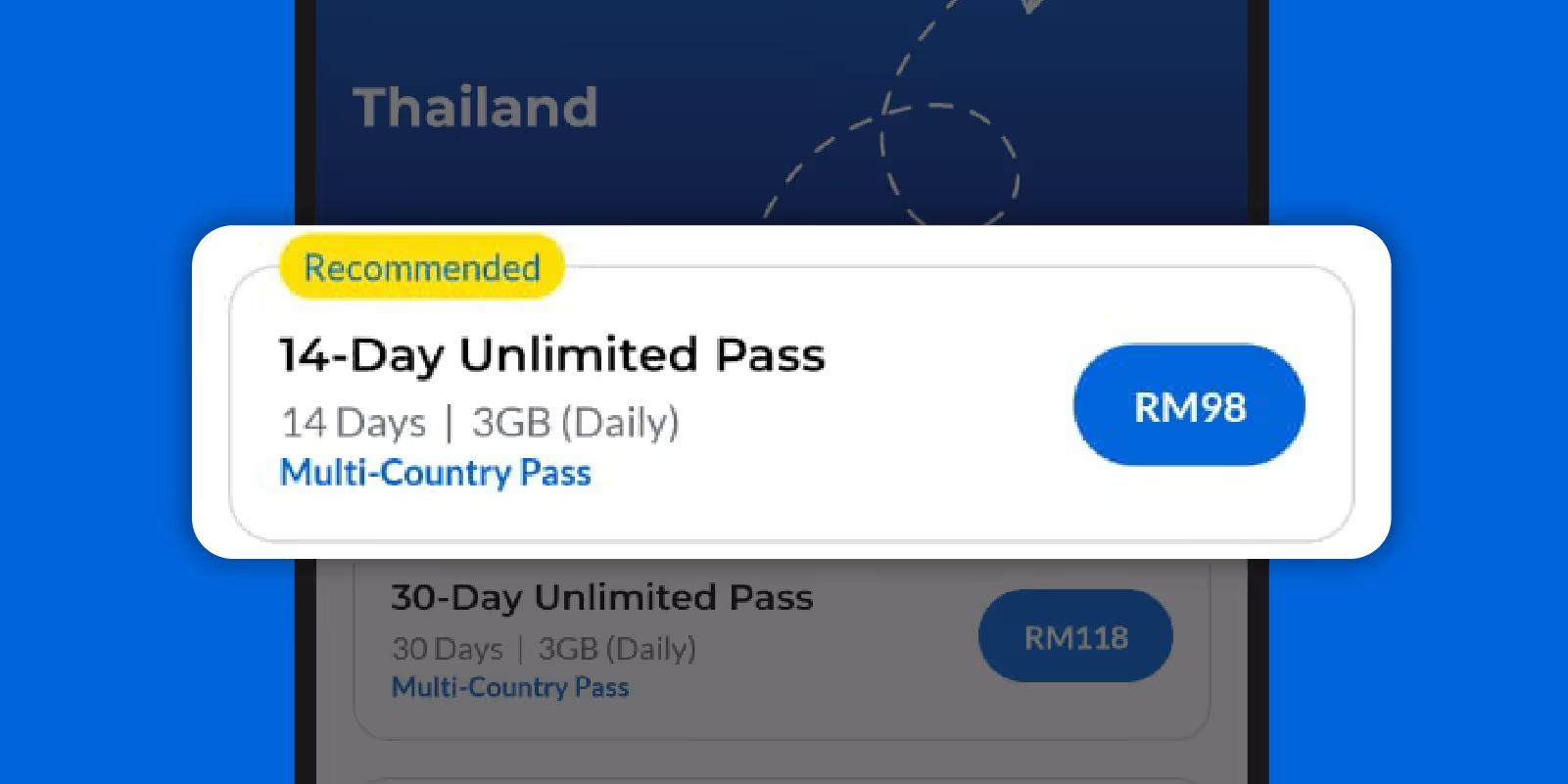
Choose your preferred roaming pass

Tap the calendar icon to set your activation date, then click ‘Next’ to complete your purchase

Your pre-booking is now confirmed

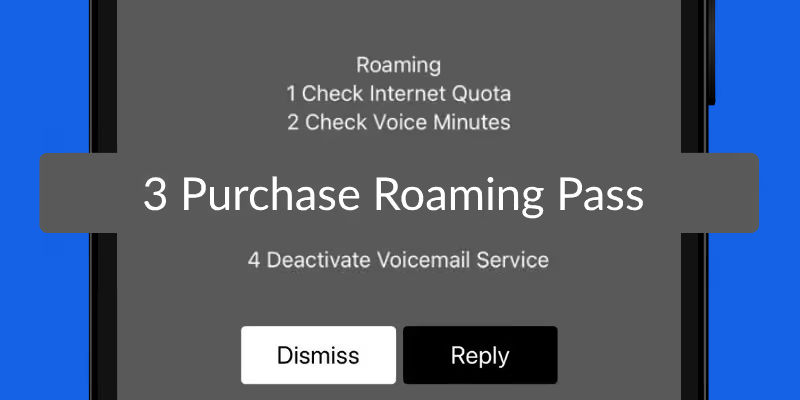
Dial *800# and select Purchase Roaming Pass
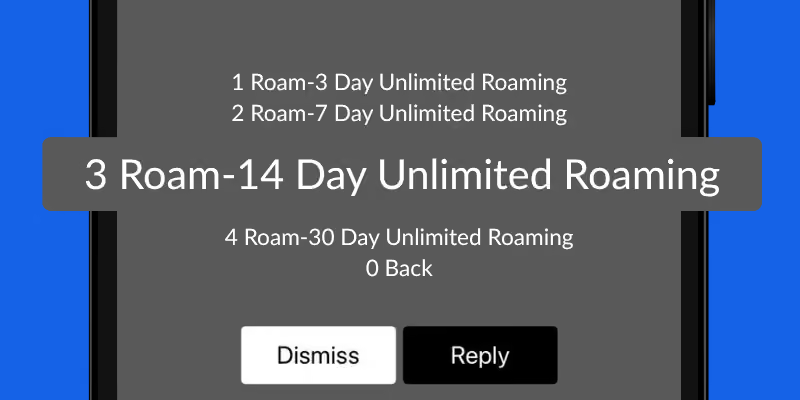
Pick a roaming pass tailored to your travel needs
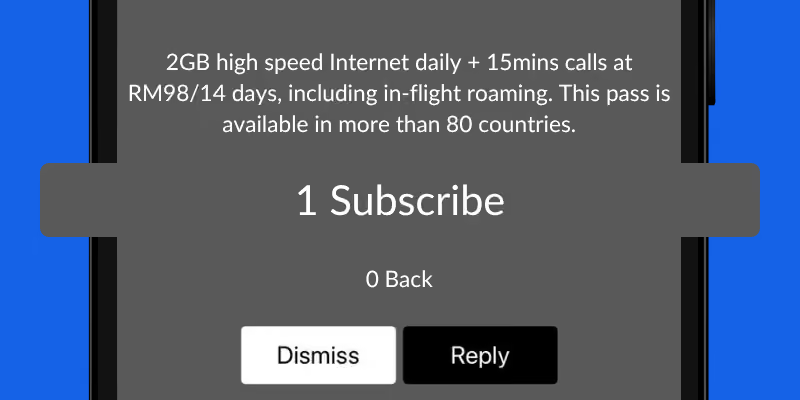
Click Subscribe
Albania · Argentina · Armenia · Australia · Austria · Azerbaijan · Bahrain · Bangladesh · Belarus · Belgium · Bosnia and Herzegovina · Brazil · Brunei Darussalam · Bulgaria · Cambodia · Canada · Chile · China · Congo DRC · Croatia · Cyprus · Czech Republic · Denmark · Egypt · El Salvador · Estonia · Finland · France · Georgia · Germany · Ghana · Greece · Guatemala · Guernsey · Hong Kong · Hungary · Iceland · India · Indonesia · Iraq · Ireland · Isle of Man · Italy · Japan · Jersey · Jordan · Kazakhstan · Korea · Kuwait · Kyrgyzstan · Laos · Latvia · Liechtenstein · Lithuania · Luxembourg · Macau · Malta · Mexico · Mozambique · Nepal · Netherlands · New Zealand · Norway · Oman · Pakistan · Peru · Philippines · Poland · Portugal · Puerto Rico · Qatar · Romania · Russia · Saudi Arabia · Serbia · Singapore · Slovakia · Slovenia · South Africa · Spain · Sri Lanka · Sweden · Switzerland · Taiwan · Tanzania · Thailand · Timor-Leste · Turkey · UAE · UK · Ukraine · Uruguay · USA · Uzbekistan · Vietnam
Albania · Argentina · Armenia · Australia · Austria · Azerbaijan · Bahrain · Bangladesh · Belarus · Belgium · Bosnia and Herzegovina · Brazil · Brunei Darussalam · Bulgaria · Cambodia · Canada · Chile · China · Congo DRC · Croatia · Cyprus · Czech Republic · Denmark · Egypt · El Salvador · Estonia · Finland · France · Georgia · Germany · Ghana · Greece · Guatemala · Guernsey · Hong Kong · Hungary · Iceland · India · Indonesia · Iraq · Ireland · Isle of Man · Italy · Japan · Jersey · Jordan · Kazakhstan · Korea · Kuwait · Kyrgyzstan · Laos · Latvia · Liechtenstein · Lithuania · Luxembourg · Macau · Malta · Mexico · Mozambique · Nepal · Netherlands · New Zealand · Norway · Oman · Pakistan · Peru · Philippines · Poland · Portugal · Puerto Rico · Qatar · Romania · Russia · Saudi Arabia · Serbia · Singapore · Slovakia · Slovenia · South Africa · Spain · Sri Lanka · Sweden · Switzerland · Taiwan · Tanzania · Thailand · Timor-Leste · Turkey · UAE · UK · Ukraine · Uruguay · USA · Uzbekistan · Vietnam
Sign up for any eligible plan or pass to unlock Malaysia's biggest digital mystery box,
featuring prizes worth up to RM20 million
A few simple steps to make sure your connection is ready for your Umrah journey


Purchase your roaming pass for Umrah in the CelcomDigi app at least 24 hours before departure

Disable voicemail to avoid unexpected roaming charges during your stay

Enable data roaming in your phone settings upon arrival to start using your pass instantly

Get on special rates on Quran, zikir, daily duas and more when you pay via CelcomDigi. Download here.

This pass is available to all CelcomDigi Prepaid and Postpaid customers.
To subscribe:
Before you travel, make sure the following settings are enabled:
International roaming on mobile line
Data roaming on your device
Your device will automatically connect to one of our preferred roaming partners in Saudi Arabia:
If you're experiencing connectivity issues, you can manually select one of these networks in your device's network settings. Click here to learn how.
You can easily monitor your roaming pass usage via:
While roaming overseas, you can reach our 24-hour customer support team by dialling *125# from your phone or contacting us via WhatsApp for assistance.



.avif)
.avif)
.avif)


